The 2FA Mandate: How Dental Practices Can Achieve HIPAA Compliance Without Losing Efficiency

It is a familiar scene in many dental offices. An assistant waits for a 2FA code to access the day's schedule, but it expires before she can enter it. What should take seconds turns into a frustrating “code chase,” slowing down the rest of the team. With new HIPAA Security Rule updates making Multi-Factor Authentication mandatory, more than 60 percent of dental practices report increased login difficulties.
MFA strengthens data protection, but it also creates real workflow challenges when teams rely on shared devices or traditional login routines. This article explores the most common MFA pain points affecting dental practices today and outlines how Unify Dental helps streamline access, reduce delays, and support HIPAA compliance without disrupting daily operations.
Challenges Dental Teams Face With Mandatory 2FA
The transition to required multi-factor authentication has introduced new layers of complexity to daily dental operations. While the security benefits are clear, the practical impact on staff routines can be significant.
1. Shared Logins Slow Down Entire Teams
Many dental offices rely on shared credentials for insurance portals, vendor accounts, payroll systems, and practice management tools. When a single device receives the 2FA code, everyone else must wait for access. Even a small delay at the front desk can create a ripple effect through scheduling, billing, and clinical workflows.
2. The Constant "Code Chase" Interrupts Workflows
Most OTP codes are sent to one email inbox or the office manager’s phone. Staff often have to call or message a colleague to retrieve the code, and by the time they receive it, it is already expired. When this happens multiple times a day, team members lose valuable time that could be spent on patient care or claims processing.
3. Workarounds Introduce Real HIPAA Risks
When 2FA slows down essential tasks, staff often resort to shortcuts that jeopardize compliance. These include sharing passwords in group chats, writing codes on sticky notes, or storing credentials in unsecured spreadsheets. These practices create significant vulnerabilities.
The American Association of Endodontists identifies poor access control and weak credential handling as leading causes of HIPAA violations in dental settings. Real cases highlight this risk. One Illinois clinic was fined ten thousand dollars after investigators discovered patient records left accessible to unauthorized staff due to improper credential storage. Other incidents involve staff bypassing 2FA entirely, resulting in unauthorized disclosures of protected health information. The AAE provides an overview of the most frequent violations that occur in dental offices for further reference.
4. Meeting Compliance Standards Without the Right Tools Creates Friction
Practices understand the need for stronger authentication, yet traditional 2FA setups were not designed for fast-paced clinical environments. The result is slower claims processing, delayed vendor access, and frequent interruptions during busy hours. Without a system built for shared workflows, MFA adds more time to tasks that were already strained.

How Unify Dental Removes These 2FA Barriers
To directly address the workflow inefficiencies, security risks, and compliance challenges introduced by mandatory 2FA, Unify Dental not only eliminates 2FA slowdowns but also streamlines daily operations through centralized credential management.
By consolidating access controls and automating code delivery for single offices, multi-location groups, and DSOs, Unify Dental significantly reduces the time spent on code retrieval and login coordination. This facilitates more efficient team collaboration, minimizes operational bottlenecks, and ensures that routine administrative and clinical workflows remain uninterrupted despite increased security requirements.
1. Centralized OTP & 2FA Code Capture
Unify automatically gathers OTP codes from SMS, email, and authenticator apps, and shows them right in the Unify extension. Teams can get codes instantly without depending on one person’s phone.
2. Secure Credential Vault for All Portals
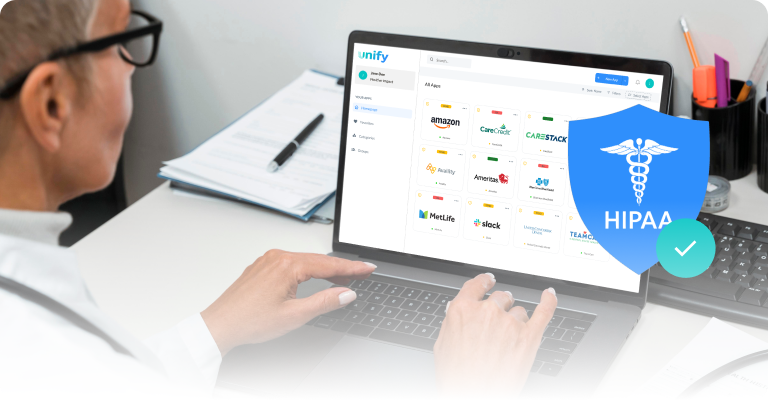
Unify replaces shared spreadsheets and unsafe storage with a HIPAA-compliant, encrypted vault. All logins for insurance portals, vendors, and PMS tools are stored in a single, secure location.
For practices that frequently use payer systems, Unify also allows teams to easily manage multiple insurance logins from a single, secure location. Learn more about insurance portal centralization here: https://www.unify.dental/insurance-portal-centralization
3. Role-Based Access for Every Employee and Location
You can limit access by role, job, or location. This prevents oversharing and ensures that every login adheres to HIPAA access control rules.
4. Complete Audit Trails for HIPAA Compliance
Every login, OTP use, and access event is recorded automatically. This gives practices clear records for audits, risk checks, and compliance reports.
5. One-Click Logins With the Unify Browser Extension
By allowing team members to log in to any necessary portal through the Unify browser extension without exposing or sharing actual passwords, Unify mitigates the specific security and workflow inefficiencies commonly associated with traditional credential sharing. In a recent implementation involving a multi-site dental group, Unify reduced average login-related delays by 35%, according to internal practice reports. This feature not only reduces operational delays by providing immediate, role-based access to essential platforms, but also decreases the risk of unauthorized account usage. As a result, Unify's single-click login capability demonstrably improves both the efficiency of daily dental office operations and the overall protection of sensitive patient data.
6. Multi-Location Management for DSOs
Unify helps large teams and multi-site operations by providing centralized oversight, consistent access rules, and easy onboarding and offboarding.
Synthesized Benefits of Unify Dental
In summary, Unify Dental offers a comprehensive solution that addresses the principal workflow, security, and compliance challenges introduced by mandatory 2FA in dental practices. By consolidating credential management, streamlining code delivery, and supporting role-based access across single and multi-location practices, Unify Dental improves operational efficiency while maintaining strict adherence to HIPAA requirements. This integration not only minimizes daily disruptions related to code retrieval and login delays but also reduces the risk of unauthorized access through secure, centralized credential storage. The platform’s audit trails, guest access controls, and smart search functionalities further facilitate compliance monitoring and ensure seamless collaboration among team members. Collectively, these features establish Unify Dental as a viable and effective tool for maintaining security and compliance without compromising workflow efficiency in modern dental practices.
One Login for All Offices
Bring every insurance portal, vendor login, and system your practice uses together in one place.
Find the Right Login Fast
Use smart search and organized categories to find any login right away.
Secure Guest Access for Vendors
Grant temporary, permission-based access to billing partners and RCM teams without displaying actual passwords.
Track What’s Working (and What’s Broken)
See which logins are expired, broken, or used often so your team never runs into surprise access problems.
Frequently Asked Questions
Yes. The updated HIPAA Security Rule is pushing all practices handling ePHI to adopt mandatory MFA for better protection against credential-based attacks.
Unify centralizes OTP codes from SMS, email, and authenticator apps into one secure extension, eliminating the need to wait for codes from a single device.
Yes. Unify provides a secure, encrypted credential vault that stores all logins and allows role-based access without exposing passwords.
Absolutely. Unify offers scalable multi-location management, centralized credential control, and location-specific access to support the growth of dental groups.
Related posts